What is the Machine Readable Zone (MRZ)? Complete Developer Guide
If you've ever looked at the bottom of a passport's data page, you've seen two lines of seemingly random characters — letters, numbers, and chevrons (<). That's the Machine Readable Zone, or MRZ.
The MRZ was designed by ICAO (International Civil Aviation Organization) in the Doc 9303 standard to let machines quickly and accurately read passport data at border crossings. Many countries began issuing machine-readable travel documents in the 1980s, and as of April 1, 2010, ICAO requires all member states to issue only machine-readable passports. The MRZ encodes the holder's name, nationality, date of birth, passport number, and more — all in a fixed-width format that's easy for OCR engines to parse.
For developers building travel, document processing, or identity workflows, understanding MRZ is essential. This guide covers everything you need to know. For a broader overview, see the Wikipedia article on machine-readable passports and the Wikiwand version.
MRZ Document Types: TD1, TD2, and TD3
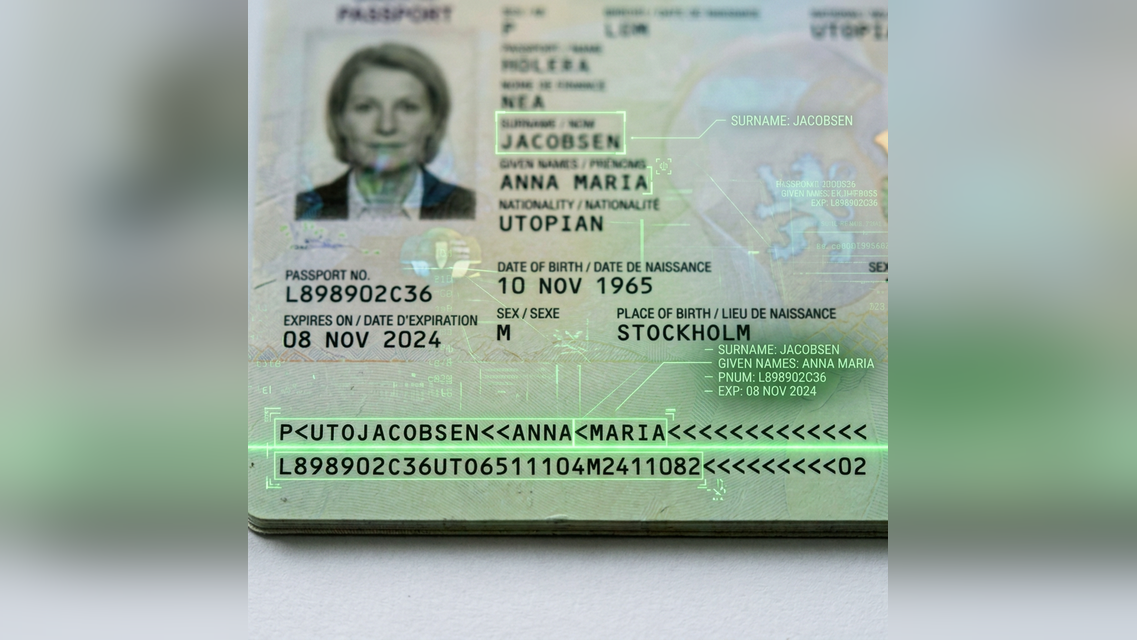
A close-up view of a Machine Readable Zone on a passport data page.
ICAO defines three MRZ formats corresponding to ISO/IEC 7810 document sizes:
| Format | Lines | Characters/Line | Used For |
|---|---|---|---|
| TD3 | 2 | 44 | Passport booklets (ID-3 size: 125 x 88 mm) |
| TD2 | 2 | 36 | Official travel documents (ID-2 size: 105 x 74 mm) |
| TD1 | 3 | 30 | ID cards, passport cards (ID-1 size: 85.6 x 54 mm, credit card-sized) |
There are also two machine-readable visa formats: MRV-A (2 x 44 chars) and MRV-B (2 x 36 chars).
Passports use TD3 — two lines of 44 characters each (88 characters total). This is the format we'll focus on, since it's the most common in API integrations.
TD3 Format: Field-by-Field Breakdown
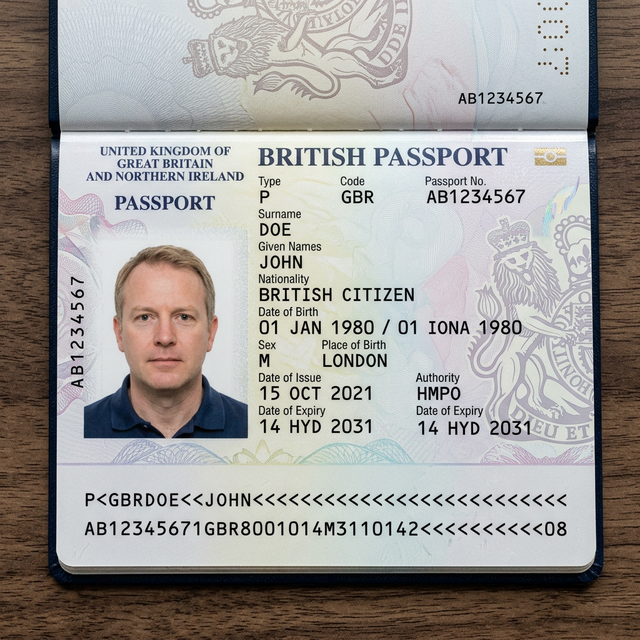
Here's an example passport MRZ (from the ICAO specification):
P<UTOERIKSSON<<ANNA<MARIA<<<<<<<<<<<<<<<<<<<
L898902C36UTO7408122F1204159ZE184226B<<<<<10
Line 1 — Identity
| Position | Length | Field | Example | Notes |
|---|---|---|---|---|
| 1 | 1 | Document type | P | P indicates a passport |
| 2 | 1 | Type subcode | < | At the discretion of the issuing country (usually < filler) |
| 3–5 | 3 | Issuing country | UTO | ISO 3166-1 alpha-3 code with modifications (UTO = ICAO test country) |
| 6–44 | 39 | Name | ERIKSSON<<ANNA<MARIA<<<... | Surname << given names. < separates multiple given names. Padded with <. |
Line 2 — Document Data + Check Digits
| Position | Length | Field | Example | Notes |
|---|---|---|---|---|
| 1–9 | 9 | Document number | L898902C3 | Alphanumeric |
| 10 | 1 | Check digit | 6 | Over positions 1–9 |
| 11–13 | 3 | Nationality | UTO | ISO 3166-1 alpha-3 with modifications |
| 14–19 | 6 | Date of birth | 740812 | YYMMDD format |
| 20 | 1 | Check digit | 2 | Over positions 14–19 |
| 21 | 1 | Sex | F | M, F, or < (unspecified) |
| 22–27 | 6 | Expiry date | 120415 | YYMMDD format |
| 28 | 1 | Check digit | 9 | Over positions 22–27 |
| 29–42 | 14 | Optional data | ZE184226B<<<<< | Personal number (country-dependent) |
| 43 | 1 | Check digit | 1 | Over positions 29–42 (may be < if all positions are <) |
| 44 | 1 | Composite check digit | 0 | Over line 2 positions 1–10, 14–20, 22–43 |
How MRZ Check Digits Work
Check digits are single-digit values calculated from the data they protect. They catch OCR errors and manual transcription mistakes.
The Algorithm
- Assign each character a numeric value:
0–9→ 0–9A–Z→ 10–35<(filler) → 0
- Multiply each value by a weight, cycling through
7, 3, 1, 7, 3, 1, ... - Sum all products
- The check digit =
sum mod 10
Example: Document Number L898902C3
| Char | L | 8 | 9 | 8 | 9 | 0 | 2 | C | 3 |
|---|---|---|---|---|---|---|---|---|---|
| Value | 21 | 8 | 9 | 8 | 9 | 0 | 2 | 12 | 3 |
| Weight | 7 | 3 | 1 | 7 | 3 | 1 | 7 | 3 | 1 |
| Product | 147 | 24 | 9 | 56 | 27 | 0 | 14 | 36 | 3 |
Sum = 316. Check digit = 316 mod 10 = 6. Matches the MRZ.
Common MRZ Character Encoding Rules
The MRZ uses a restricted character set — only three types of characters are allowed:
- A–Z (uppercase Latin letters only)
- 0–9 (Arabic numerals)
<(filler character — replaces spaces, punctuation, and unused positions)
Name handling
- Surnames and given names are separated by
<< - Multiple given names are separated by single
< - Spaces and hyphens in names are replaced by
< - Apostrophes are omitted entirely (e.g.,
O'Brien→OBRIEN) - Diacritics are transliterated per ICAO rules (e.g.,
Müller→MUELLER,ß→SS,æ→AE) - If names are too long for the 39-character field, they are abbreviated to their most significant parts
Date Handling: The Y2K Issue
MRZ dates use YYMMDD format with no century indicator. The standard convention:
- 00–99 for birth dates: interpret based on reasonable age (e.g.,
990101= 1999-01-01) - Expiry dates: typically within 10 years of issue, so context determines century
Most MRZ parsing libraries handle this automatically.
Extracting MRZ Data with an API

While you can parse MRZ text manually, the harder problem is detecting and reading the MRZ from a passport image. This requires:

An illustration of how OCR technology extracts data from a passport.
- Image preprocessing — rotation, cropping, contrast adjustment
- MRZ region detection — finding the two text lines at the bottom of the page
- OCR — converting the image region to text
- Parsing + validation — extracting fields and verifying check digits
With the Passport OCR API, you can do all of this in a single HTTP call:
curl -X POST https://passport-ocr.com/v1/ocr \
  -F "[email protected]"
Response:
{
  "success": true,
  "data": {
    "documentType": "PASSPORT",
    "documentNumber": "L898902C3",
    "issuingCountry": "UTO",
    "lastName": "ERIKSSON",
    "firstName": "ANNA MARIA",
    "nationality": "UTO",
    "dateOfBirth": "1974-08-12",
    "sex": "female",
    "expirationDate": "2012-04-15",
    "personalNumber": "ZE184226B"
  }
}
No setup, no API key required for your first 10 requests per day.
Why MRZ Still Matters
Despite being a decades-old standard (countries began adopting it in the 1980s), MRZ remains the most reliable way to extract passport data:
- Standardized globally — every ICAO-compliant passport uses the same format, mandated since 2010
- High OCR accuracy — the fixed-width monospaced font (OCR-B) was designed specifically for machine reading
- Built-in error detection — check digits catch most OCR and transcription errors
- Fast processing — parsing is deterministic, no AI/ML needed for the text parsing step
For developers building travel tech, hotel check-in, document workflows, or any system that needs passport data — MRZ extraction via OCR is the most practical approach.
Next Steps
- Try the API free — 10 requests/day, no signup required
- Read the API docs — full endpoint reference with code examples
- See pricing — $0.01 per request, no subscriptions
Further Reading
- ICAO Doc 9303 — Machine Readable Travel Documents — the official specification
- Machine-readable passport — Wikipedia — comprehensive reference with country-specific details
- Machine-readable passport — Wikiwand — same content, cleaner reading experience
Disclaimer: Some images in this post, including the passport and scanning illustrations, are AI-generated for illustrative purposes and do not represent real documents.
Ready to extract passport data?
Try Passport OCR free — 10 requests per day, no signup required.